Sunday, September 22, 2013

Microsoft Surface Pro 256GB Tablet available now…

Screenshot (33)

Back in February Microsoft released the Surface Pro which has a storage capacity of either 64GB or 128GB. I have been quite happy with my 128GB Surface Pro despite some of the bad reviews claiming that battery life was in the 3 to 4 hours range. I personally can get through an eight hour day with my Surface Pro using it on “Power Saver” settings, of course this is using it on and off during the day when I am out on meetings.

Fast forward seven months later, Microsoft makes the 256GB Surface Pro available. I would have liked if Microsoft had made the 256GB Surface Pro available at launch. I would have paid the extra to get the 256GB version if it was available at the time.

Microsoft will be holding an announcement September 23, which should bring to light, the new Haswell Surface Pro along with several new accessories and we should also hear more on the 256GB Surface Pro.

Tuesday, September 17, 2013

Microsoft announced pricing for Windows 8.1 starting at $119


Now that Microsoft has announced the pricing for Windows 8.1, you can expect starting price at $120 for Windows 8.1 if you are upgrading from any other previous version of Windows or $199 for Windows 8.1 Pro version. Same applies to Windows 8.1 Pro, this price is for upgrading from any previous Windows or if you plan to run Windows 8.1 on a VM machine.

If you are already running Windows 8 on your current system, Windows 8.1 will be a free upgrade to your current version of Windows 8 you have.

For those that happen to downloaded Windows 8.1 RTM from MSDN or TechNet, and already have your product key from Windows 8. You can still continue to use your existing Windows 8 key, but you will have to use the product key from your subscription to get Window 8.1 RTM to load. Once it has installed. Go to your activation and chose to put your key, at this point you will use the Windows 8 key. After all, Microsoft is providing Windows 8.1 as a free upgrade so why not use your key.

Microsoft has done some great improvements with Windows 8.1, as I have been using it on the Lenovo ThinkPad Tablet 2 with 4G LTE. I wiped everything and did a fresh install to test out if everything would work. Once I installed some drivers from Lenovo everything has been very smooth on the ThinkPad Tablet 2. I will do some quick videos showing some of the new features you can find with Windows 8.1.

Sunday, September 15, 2013

Asus Bay Trail $349 Transformer Book T100 priced just right!

Once again Asus introduces a low cost Windows tablet. This past week at IDF (Intel Developer Forum), Asus announced the Asus Transformer Book T100, which will start at $349 for the 32GB and $399 for the 64GB version. Set to be released on October 18, running Windows 8.1.

With its new Atom Z3740 quad-core processor you will see a great increase over the current Atom Z2760 processor. The Transformer Book T100 will have a 10.1-inch IPS HD display with 178 degree viewing angles. The T100 will have 1366 x 768 resolution, would have been nice to see a little better resolution as we should see with some others.

Lets not forget that the T100 will also be packing 2GB of RAM, microSD card slot, 1.2MP front facing camera, with no rear camera, a micro USB port and headphone jack. We should expect battery life around 11 hours of web browsing, which should be enough power for most task on the road.

The Transformer Book T100 will come with Microsoft Office Home & Student 2013 included, this should satisfy most user that Asus is targeting the T100 at, with full version of Word, Excel, OneNote and PowerPoint.

Currently Asus has been selling the Asus VivoTab Smart ME400C for $399, with 64GB and Windows 8. Not bad for the current line up that is available now, but looks like the T100 with the included keyboard dock will once again make Asus Transformer Book T100 best value for the price.

If you can't wait and looking for great low cost Windows 8 tablet, head over to the Microsoft Store.

Tuesday, September 10, 2013

Windows 8.1 RTM: Upgrading from Windows 8.1 Preview? Don't forget to run diskcleaner

 
For those that have been lucky enough to get your hands on Windows 8.1 RTM, and went the upgrade path from Windows 8.1 Preview, don't forget to run the disk cleanup and clear "Previous Windows installation". This can free up some extra GB, and with just having128GB SSD on the Surface Pro, the extra 6.69GB is well welcomed on my Surface Pro.

Just head over to your desktop and open up file explorer, navigate over to your C:\ drive and right click it. Chose properties and click on "Disk Cleanup". Let it do its thing, you should then get the Disk Cleanup box. Check off what you want cleaned up and enjoy your extra space.


In my case, after running disk cleanup I now have 93GB free space. For now, I will take as much as I can, would like to see 256GB SSD become a standard for the Surface Pro.
 
Also I have picked up a 64GB microSD card to store pictures, music, documents and sync my Skydrive. 

Saturday, September 7, 2013

Sony introduces the Xperia Z1 at IFA 2013


Sony announced the upgrade to the Xperia Z at IFA 2013 with the Xperia Z1. Sony has packed some real punch with the Xperia Z1 which is also packing a powerful camera. The Z1 will be competing with the Nokia Lumia 1020 and the 900 series Lumia's. As the consumers demand for better cameras on their phones and more power, the Xperia Z1 is no slouch with its Snapdragon 800 chipset and the 20.7MP camera with G Lens. We should expect some great shots, given the big 1/2.3 sensor, and with its great 5-inch display, you will be able to view those great shots.

Sony Xperia Z1:
  • Quad-band GSM/GPRS/EDGE, penta-band UMTS/HSPA, 100 Mbps LTE
  • Water-resistant camera phone
  • 144 x 74 x 8.5 mm, 170g
  • 5" 16M-color 1080p (441ppi) capacitive touchscreen TFT Triluminous display with X-Reality and OptiContrast
  • Qualcomm MSM8974 Snapdragon 800, quad-core 2.2 GHz Krait 400, Adreno 330, 2GB
  • Android 4.2 Jelly Bean
  • 20.7MP camera with 1/2.3" Exmor RS sensor and Sony G Lens, F/2.0 aperture; 2MP front-facing camera
  • Video camera with 1080p video capture and HDR mode
  • Built-in 16GB storage, microSD card slot, up to 64GB
  • Connectivity Wi-Fi a/b/g/n, Wi-Fi hotspot, Bluetooth 4.0, standard microUSB port with MHL and USB host, GPS receiver with A-GPS, 3.5mm audio jack, NFC
  • Sealed battery - 3,000mAh battery
  • Water resistant with IP58 certified - dust-sealed and water resistant beyond 1 meter; shatter proof and scratch-resistant glass for the front and the back panel, metal frame on the side
 
 The solid one-piece aluminum frame on the Sony Xperia Z1 gives it that great classy look, and the with round edges should make it very comfortable to hold in your hand.
 
Sony has packed in a 1/2.3 sensor, which is what you can find in most point-and-shoot cameras. Though this is not as good as the Nokia Lumia 1020, but you should be able to get great shots. This is also same sensor you will find in the Galaxy Camera and the Galaxy S4 Zoom Camera. Will be looking forward to testing the Sony Xperia Z1 later this coming weeks.


 If you are the type that likes to bring your phone to pool party's, you'll be glad to hear that the Sony Xperia Z1 can withstand 30 minutes underwater at 1.5 meters deep. This will also come in handy on a rainy day, if you happen to need to take a picture.
 
When the Sony Xperia Z1 becomes available globally in September, it will be running Android 4.2.2 Jelly Bean. This is what most non Google device are running, which in other words, is the latest OS that you can find.
 
The Sony Xperia Z1 is also taller and wider than the current Samsung Galaxy S4, but still will be very easy to slip into your pant pocket without thinking about it twice.


Sunday, September 1, 2013

Win Free Copy of WinX HD Video Converter Deluxe

converter-deluxe-mini01

Here is a great way to convert your videos you always wanted to have on your mobile phone, tablet or any other device to take on the road. WinX HD video converter has the program just for that. The best part is if you leave a message I will be picking some lucky winners for the full product.
With WinX HD video converter you can edit, trim merge and add subtitles very easy to your video project. You will also be able to output your video files in the highest possible quality. Video resolution and bitrate parameters are totally adjustable so you can balance the video quality and the file size, great for YouTube!

Okay I will be giving away a few licenses for WinX HD video converter, just leave a comment after I tweet, you can follow me over at @MobileHG and leave a comment, and I will randomly chose from the comments. Good luck!

Monday, August 26, 2013

Nexus 7 2nd Generation Keyboard Stand Case review.

Looking for a bluetooth keyboard case for your new Nexus 7 2nd generation? MiniSuit has just released the Nexus 7 keyboard stand case, which you is very light weight and very portable.

I have been using the MiniSuit keyboard stand case with my Nexus 7 2nd generation for about a week now, and it has been a very productive tool for on the road writing. Sure I wasn’t writing a novel, but for writing documents and long emails that would require more than the on screen keyboard, the bluetooth keyboard stand case from MiniSuit has provided this for me.

Wednesday, August 7, 2013

Android Device Manager: Setup remote wipe and locate your device…

Screenshot_2013-08-07-21-08-01

Just a few days ago Google had announced Android  Device Manager. This would at least bring Android OS with the ability of wiping, locate and soon be able to lock your Android device.

Unfortunately its not available on all Android devices. As I was testing on a few devices of mine. On my wife’s Galaxy SIV the Android Device Manager wasn’t available under the Google Settings in the apps. This is the Green icon in your apps that is called Google Settings, has a letter “g” and sort of a gear icon.

Wednesday, July 31, 2013

Case Review: Classic stand case cover for Microsoft Surface Pro tablet


DSC04204 (1280x851)

I decided to give the classic stand case cover with the stylus holder for my Microsoft Surface Pro a try. If I use any type of cases I usually like to keep them as slim as possible to add the least amount of bulk, yet keep my devices looking clean and protected. This is the case with the classic stand case from MiniSuit.

Another advantage of the classic stand case cover is that you can still have either the type or touch keyboards attached to your Surface Pro or you can chose to remove them and still use the classic stand case. This alone is a great deal for me, as sometimes I travel knowing that I will be using the keyboard.

Lets take a look the classic stand case cover and see how well it fits around the Surface Pro.

Sunday, July 14, 2013

Case Review: Jison Executive Folio Case for Galaxy S4


DSC04025 (1024x680)

If you are in the market for a good quality case for your Samsung Galaxy S4, look no further. I happen to order the Executive Folio case for the Galaxy S4 to give it a try. I look for slim type cases, unless I need a more protective type case, then I look for that type of case, especially when going camping or if I am going to be working around the house I will slip my Galaxy S4 into that type of case.

I was very impressed with the quality and design of the Executive Folio case. I have ordered cases where stitching is bad, or sometimes the leather is not well cut. The Executive Folio case is priced at $49.99 at Jison case website at the time of this writing.

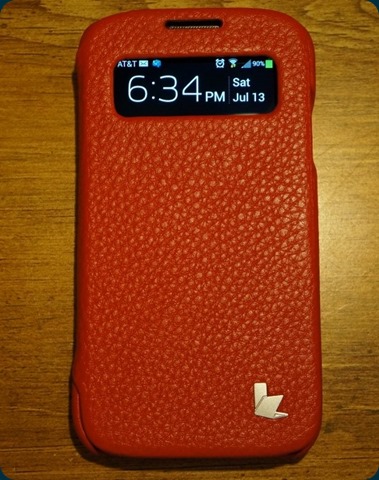
As I slipped my Galaxy S4 into the Executive Folio case, the Galaxy S4 fit like a glove. All the corners fit correctly, openings lined up and since the Executive Folio case does have the front window, just like the S-View Flip case from Samsung. You can answer and see any notifications at a glance. This was great feature that Samsung came out with on the Galaxy S4.

Here is more detail look at the Executive Folio case if you want to get an idea what to expect.

Jison Executive Case Red

The inner lining of the Executive Folio case is made of soft material, seems to feel as if it was made of leather. It has the logo printed all across the inside, gives it a nice touch and keeps your phone from getting scratched with the soft material.

DSC04016 (1024x680)

As you can see, my Galaxy S4 fits in nicely in the Executive Folio leather case. Having the flip cover, this will help to protect your Galaxy S4 phone in case you drop it. It does have the bottom and top open, but as you can see the corners are protected. This of course wont replace an Otter Box case, but this isn’t intended for that type of protection.

DSC04031 (1024x680)

Here is the back view of the Executive Folio case, as you can see that the speaker and camera line up very nicely. The leather is very nice on the Executive Folio, doesn’t feel like it is the cheaper leather.

DSC04097 (1024x680)

There is one negative that I did run into using the Executive Folio case so far, and is the only one. Normally on the Samsung S-View Flip Folio case, the window is bigger and allows you to flip the front flip cover to the back and be able to take pictures. Well with the Jison Executive Folio case, seems that maybe I got a bad cut out but it does cover part of the camera and doesn’t allow me to take a picture without having part of the flip cover be in the way.

Check out more views of the Jison Executive Folio case below.

Jison Executive Folio case review for Samsung Galaxy SIV