
Sunday, April 22, 2012
Asus Transformer Prime first look at the GPS Extension Kit
Asus has officially started shipping out the GPS Extension Kit to users that have requested one. You can head on over to Asus VIP website to apply for your GPS Extesion Kit. The offer will expire July 31, 2012 so you do have a bit of time to claim your kit. Since the Transformer Prime was released back in December, you might recall many users reported having GPS issues all over the internet. Asus released several Firmware updates and none of these addressed the GPS issue. The GPS issue is more releated to design flaw because of the all metal back cover. Maybe Asus figured that it would cost less to design the GPS Extension Kit, then rather recall and replace all the Transformer Prime back metal cover with something that would have a plastic insert at the top similar like the Transformer Pad Infinity. In either case, Asus has done a great job in providing a work around to the GPS issue, I would rather have the internal GPS working, againg that's just me.

Asus releases official Transformer Pad 300 video
Amazon is showing delivery of April 22nd for the 32GB Transformer Pad 300, so if your interested in placing your order, you might want to head on over and claim your Transformer Pad 300.
The Transformer Pad 300 will have under its hood, the Tegra 3 1.2GHz which should be enough power for your daily tasks, all with Android 4.0 Ice Cream Sandwich. And if your up to getting a dock, well Asus has designed the Transformer Pad 300 to be able to be used with an optional keyboard dock just like its bigger bother Transformer Prime. In my opinion, this has to be the best design in a tablet. Not only you have the dock, the keyboard dock has a built in battery that charges your tablet to give you all day productive use of the tablet.
Wednesday, April 18, 2012
Samsung Galaxy Note quick view of S-Pen Notes
We already known that ICS 4.0 will be coming to the Samsung Galaxy Note, but some of you my not have known that with ICS 4.0, Samsung is including the new S-Pen Notes application. This is part of the Premium software upgrade that Samsung is including. This just might be one of the best software features for the Galaxy Note. If you thought the current S-Memo application was great, wait till you give the S-Pen Notes application a try. You just might not want to go back to another mobile phone.
Samsung had promised that the Galaxy Note was going to be one of the first in line to receive ICS 4.0, but got pushed back for 2Q release. Well now seems that it is very close to getting pushed out, there is several forums showing ICS 4.0 on the Galaxy Note, that is unofficially of course. You don't get the Premium software that Samsung will providing if download and install a leaked version, but you will be able to get a taste for ICS 4.0 if you feel brave enough.
Tuesday, April 17, 2012
Acer Iconia Tab A510 available now

If you head on over to Amazon you can now order the Acer Iconia Tab A510 10.1-Inch Tablet (Olympic Edition-Black) and have it by Thursday. This is of course for the black one, if you want to be among the first with bragging rights, just add it to your shopping cart and check out. After that, the waiting is the real killer.
The Acer Iconia Tab A510 starts at $450, which is a good sign that we should start to see even lower starting price for other tablets. The Tab A510 comes loaded with some great specifications.
Product Features
Android 4.0 Ice Cream Sandwich
1 GB SDRAM
10.1-inch screen
13 hour battery life
802.11bgn wireless
Processor, Memory, and Motherboard
Hardware Platform: PC
Processor: 1.3 GHz Tegra 3.0
Number of Processors: 1
RAM: 1 GB
RAM Type: SDRAM
Hard Drive
Size: 32 GB
Type: Serial ATA
Sound
Speakers: Stereo Speakers
Ports and Connectivity
USB 2.0 Ports: 1
Cases and Expandability
Size (LWH): 10.2 inches, 0.43 inches, 6.9 inches
Weight: 1.54 pounds
Power
Battery Type: Lithium ion
Rated Charge (normal use): 13 hours
Wireless
Wireless Type: 802.11bgn
Will Upcoming Samsung's Galaxy Tab 2 10.1 Dethrone the Asus Transformer Prime?

Recently Samsung was set full force to release the upcoming Samsung Galaxy Tab 2 10.1 tablet to compete among some of the big boys, but now, looks like Samsung has ceased production of the Galaxy Tab 2 10.1. Rumor out of Samsung in Korea is, Galaxy Tab 2 10.1 will be receiving a quad-core processor. This could be Samsung feeling the heat from some of its rivals, like the 3rd Generation iPad and the Asus Transformer Prime. It didn't make sense for Samsung to release the Galaxy Tab 2 with a slower dual-core processor compared to Asus's upcoming Infinity TF700T tablet. Asus's Transformer Prime launched with its shares of problems, and up to now, many users are still reporting GPS and WiFi issues. Asus has announced they will be releasing a GPS dongle to fix the GPS issues, but how many will jump to the Galaxy Tab 2 10.1 running quad-core processor?
At this point, no word if the Galaxy Tab 2 10.1 will actually receive the Exynos 4412, or maybe some step down form of the 4412 at lower clock speed. Either way, this will be a welcome in the competition and hopefully the starting price will remain at $399.
I am more interested in the Galaxy Note Tab 10.1, but sure would be nice if Samsung could design a keyboard dock like the Asus Transformer Prime. If Asus had released the Transformer Prime with Wacom digitizer, this would have been the best tablet for me!
Sunday, April 15, 2012
First look at the Asus Transformer Prime GPS dongle

After hearing from many Transformer Prime users with GPS isuses and not working, Asus developed a GPS dongle that will fix the GPS problem everyone is having. Asus will be sending the GPS dongle to all register Transformer Prime owners free of charge. Over at Land Of Droid, they have posted up some pictures of the GPS dongle. Looks like Asus has done a good job in the GPS dongle design, but I don't see this having some kind of dock pass through. I would have like to seen that you would be able to have the GPS dongle and be able to charge your Transformer Prime at the same time. Well I guess you can't be to picky, at least Asus did try to correct the issues with the GPS. Maybe Asus should have saved its development in the GPS dongle and just designed a new back plate with a plastic strip at top, and recalled all Transformer Prime's.
Users sounded off through out many forums expressing the same issues, and some also had WiFi issues. Asus was good in responding in trying to fix the GPS issue by releasing several Firmware upgrades, but no matter how many Firmwares are released, nothing can fix faulty design. Again, the trouble was that the Transformer Prime back plate is all metal causing GPS not to work properly. Over time, Asus did release other versions of the Transformer Prime which Asus never admitted to changing anything on the Transformer Prime, but seemed that some of the Prime's with c3OK serial number, would actually some what work good. Maybe Asus modified the antenna, and some users went as far as trying to add antenna's inside the Transformer Prime to improve the GPS and WiFi, which it did, but as soon as the antenna was put inside and the back metal plate was placed back the signal dropped just as bad.

Here you can see the bottom of the GPS dongle that will snap into the Transformer Prime. The GPS dongle seems to be well designed.

Here is another view of the GPS dongle, and on the right you can see the unlock switch that will release the GPS dongle when you are ready to remove it from your Transformer Prime. Asus will be announcing the GPS dongle in the next day, so you will be able to find out more details on how you can claim your GPS dongle.
Asus Transformer Pad 300 Tablet hitting stores April 22

Asus is getting ready to release the much awaited Transformer Pad 300 Tablet April 22 and Asus has also corrected the design on the Transformer Pad 300, by having the back cover made out of plastic, which the Transformer Prime has a metal back cover causing a lot of GPS and WiFi issues because of the metal back.

The Transformer Pad 300 Tablet will be available in red, white and blue which Office Depot is showing the blue Transformer Pad 300 on its website. You can add it to your cart, but you will have to wait for the the Pad 300 to ship and hope that it does ship out before April 22 so that you can be among the first to receive the Pad 300.
Asus has done a great job with its tablets by designing an optional keyboard dock that also has a battery to charge the tablet at the same time. This makes the best tablet option for those that really want to be able to use the Transformer Pad 300 as a Ultra-Notebook or as Netbook. The dock also comes with a full size USB and full size SD card reader to give you more options to get documents, pictures, and other information on your tablet. Then when your ready to just use the Transformer Pad 300 as a tablet, just undock and your ready to use without having to pull out of any type of case or some other slip on keyboard type of case.
The Transformer Pad 300 will include the Tegra 3 quad-core processor to give the user a great experience with the tablet. It won't be as powerful as its big brother the Transformer Prime, but should be able to keep with no problem.
Transformer Pad 300 Specs:
Device Info
- Device Name : Transformer Pad 300
- Manufactuer : Asus
- Carrier : NA
- Announced Date : February 27, 2012
- Release Date : TBA
- Also Known As :
Display
- Screen Size : 10.1 Inch
- Resolution : 1280x800
- Screen Type : IPS LCD
Dimension & Weight
- Height : 10.35 Inch
- Width : 7.12 Inch
- Depth : 0.39 Inch
- Weight : 635 Grams
Battery & Power
- Battery Type:
- Lithium Polymer
- Battery Capacity : mAh
- Talk Time : NA
- Stand By Time : NA
Software
- Android OS:
- 4.0.x
- Audio Playback:
- AAC
- AAC+
- MID
- MP3
- WMA
- Video Playback:
- h.263
- h.264 / AVC
- MPEG-4 (MP4)
- Messaging:
- SMS
- MMS
Hardware
- CPU : Tegra 3
- CPU Clock Speed : Mhz
- Core : 4
- Ram : 1024 MB
- Internal Storage : 16 GB
- Front Facing Camera :

- Camera Resolution : 8 MP
- Camera Features:
- Auto focus
- 1080p Video Recording
- Sensors:
- Accelerometer
- Ambient light
- QWERTY :

Cellular Network
- Network Technology:
- GSM
- GSM Band:
- 850
- 900
- 1800
- 1900
Device Connectivity
- Wi-Fi:
- 802.11b
- 802.11g
- 802.11n
- Bluetooth:
- Bluetooth 3.0
- Location Features:
- GPS
- Cellular location
- Wi-Fi location
- FM Radio :
- NFC :
Saturday, April 14, 2012
Nokia Lumia 900 gets data fixed and get your $100 credit

Nokia started out the gate with a bug that was causing some users to have data issues on the Lumia 900. Nokia announced that anyone that picked up the Lumia 900 would receive $100 credit back to their AT&T Account. This would make the Lumia 900 free, but if you pick up the Lumia 900 at Fry's you will make out with some extra cash, as you would qualify for the $100 credit till April 21st and get the Lumia 900 for $44.99. You can also head on over to Amazon, which also offering the Lumia 900 for $44.99. This of course is with the 2-year commitment.
If you had been thinking of getting the Nokia Lumia 900, now would be the best time to get one. As Nokia has officially announced the software update to fix the data connectivity issues 3 days early, which you can apply either by downloading through Zune PC software or Windows Phone 7 connector for the Mac.
Saturday, December 3, 2011
Reviewing the Samsung Series 7 Slate PC

Samsung has released the much awaited Series 7 Slate PC tablet that was given away at the Developers conference this past September. After getting my hands on the Samsung Series 7 slate, I can say, this is the tablet to beat as a full PC slate computer. The build quality is very good all around with smooth round edges, making it great to hold the slate. Despite the thinness of the slate, Samsung managed to really pack some serious power under the hood with the i5-2467M processor to make everything open up very quickly with hardly any waiting. It is light enough at 1.98 lbs. to hold it, and use it as a digital writing pad and browse the web. There is no replaceable battery on the back, but you easily can get a good 7 hours of battery life, which should get you through any meeting.

The Samsung Series 7 Slate PC comes with Windows 7 and a 11.6-inch screen that is very bright, vivid and very responsive to the touch as well with the stylus. I have installed the Windows 8 Developer Preview on the Samsung Series 7 Slate, and have been using it for about a week and have to say that the touch is great using it with the Samsung Series 7 Slate. There is still some work that Microsoft needs to make it more tablet friendly, like making scroll bars or buttons a bit bigger for touch. Everything runs smooth and boots up in less than 10 seconds from a complete shut down, making it perfect for saving battery if you want to do a complete shut down and not having to wait for the long boot up to start working. I can see taking this to this years CES 2012 to be able to edit videos and pictures as it is very fast and is able to handle the task. All this without the bulk of a complete laptop because I can carry it as tablet to take notes.

The back of the Samsung Series 7 Slate is made of some type of metal that is very sturdy and is very nice as it is round around to give you a better hold on the tablet. You can see there is not much on the back, the vent slot for the air circulating, rear 3MP camera and the "Samsung" logo. I really like how Samsung kept it simple. Looks very classy.

The rear 3MP camera won't be replacing any point and shoot camera, nor will it be replacing my phone camera. This was in low light but would have been nice, after all this is the top of the line tablet, Samsung should have included at least a 5MP camera with better optics.

On the right side you have the power button and below is the screen rotation lock button. You can see below the screen rotation lock button is the door for the 3G SIM card. When the slate is on you will see a blue LED light up above the power button. Again, very clean and simple on the sides.

On the top you will find the MicroSD card slot, would have been nice if this was a full size SD card. This could have given you the ability to use a 64GB SD card to increase the storage space for your documents or anything else. Also on the top is (2) two mics. This makes the noise cancellation much better to record notes in OneNote and other applications.

On the left side you will find the (1) one USB port, Headphone/mic combo, Volume buttons, Micro HDMI port and the PSU port. Again, very well placed and very clean.

On the bottom of the slate, you will find the docking port connection, along with right and left speakers. The sound is pretty loud in an average room with noise, but if you want to play some music, you will need to be looking for some external speakers to play the sound.

The dock for the Samsung Series 7 Slate PC is built solid and very nice that you can close a lid when not using the dock to keep the dock connection from been exposed.
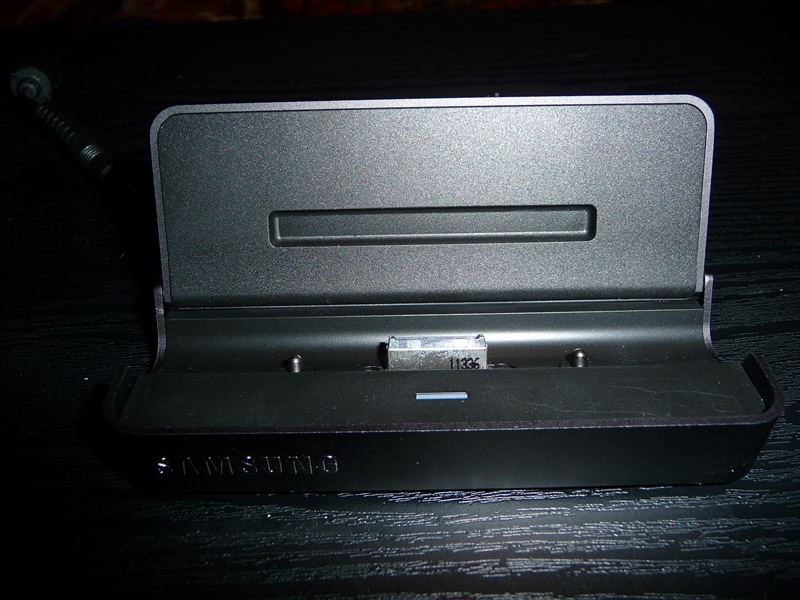
Here you can see the dock with the top lid open, ready for you to place the slate in it. There is also a blue light that lights up when you have the slate in the dock and have the power charger connected to it.
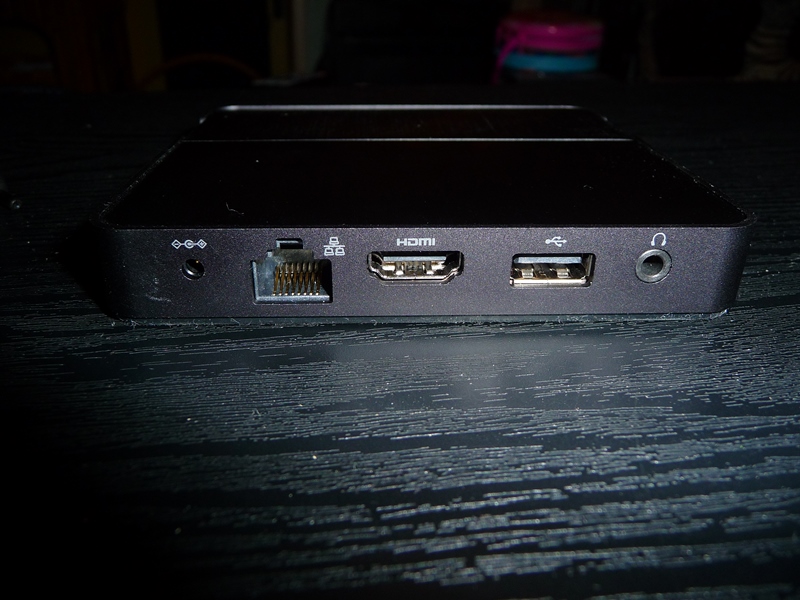
On the rear of the dock, you have for the power adapter charger, RJ45, full size HDMI, USB port and an external headphone jack. The bottom of the dock has a rubber like bottom to keep the dock from sliding and also has a nice weight to it to keep the tablet from tipping over or sliding.

Holding the Samsung Series 7 Slate PC in portrait is very comfortable and not heavy to me at all. Swiping through all the Metro apps and through webpages is very fast. I will be doing a video to show some of the features running with Windows 8 Developer preview.

I have had at times, (15) tabs in the browser, Outlook, Word, OneNote, and Windows photo gallery open and I haven't had any slow performance on the Samsung Series 7 Slate. With the 128GB SSD and 4GB of RAM, keeps this slate running smooth and fast through out.
Processor
• Intel Core i5 i5-2467M / 1.6 GHz
• Multi-Core Technology
Dual-Core
• 64-bit Computing
Cache Memory
• Type
L3 cache
RAM
• Installed Size
4 GB
• Technology
DDR3 SDRAM - 1333 MHz
Storage
• Hard Drive
64/128 GB Solid State Drive
Card Reader
• Card reader type
Card reader
• Supported flash memory cards
microSD
Display
• Display Type
11.6 in Yes TFT active matrix
• LCD Backlight Technology
LED backlight
• Max Resolution
1366 x 768 ( WXGA )
• Widescreen Display
Yes
• Features
SuperBright Plus
Video
• Graphics Processor / Vendor
Intel HD Graphics 3000 Dynamic Video Memory Technology
Audio
• Audio Output
Sound card
• Audio Input
Microphone
Notebook Camera
• Camera Type
Integrated
• Sensor Resolution
3 Megapixel (back), 2 Megapixel (front)
• Camera Features
Second camera
Input Device(s)
• Input device type
Touch-screen
Networking
• Networking
Network adapter
• Wireless LAN Supported
Yes
• Data Link Protocol
Bluetooth 3.0 HS, IEEE 802.11b, IEEE 802.11n, IEEE 802.11a, IEEE 802.11g
• Compliant Standards
IEEE 802.11g, IEEE 802.11a, IEEE 802.11n, IEEE 802.11b, Bluetooth 3.0
Expansion / Connectivity
• Interfaces
1 x Headphones, 1 x Microphone - Input - Mini-phone 3.5 mm, 1 x Hi-Speed USB - 4 pin USB Type A
Miscellaneous
• Features
Hard drive password
Power
• Power Device
External
• Power Provided
40 Watt
Battery
• Technology
4-cell Lithium polymer
• Installed Qty
1
• Capacity
5400 mAh
Operating System / Software
• OS Provided
Microsoft Windows 7 Professional 64-bit Edition
Subscribe to:
Posts (Atom)